Skip to content
Slipstream agent · Data

Data Analyst

A CSV and Excel analysis agent for Claude Code, Codex and Cursor

Data Analyst answers questions about one CSV or Excel table, in plain English or structured, with charts, and recomputes every number a second way before it reports it. A run costs 800 credits, charged only when the run succeeds.

Not offered in ContextStream yet. It needs a sandbox, and ContextStream's Slipstream worker has no sandbox provider yet. Version 1.1.0 · Updated

What does Data Analyst do?

Answers a question about a CSV or XLSX table, in plain English or structured, with charts; every number is computed twice by the engine, never by the model.

What it declines

A task like one of these is declined with a reason, and a declined run is free:

  • Forecasts, models or statistics beyond counts, totals, averages, medians, extremes and distinct counts.
  • Changing, cleaning or exporting the data.
  • Web pages, PDFs, images or databases, and files behind a login.
  • Writing or running analysis code: the model only chooses the questions.

What does a real run of Data Analyst look like?

The input, the result (shortened where it is long), how long it took, what it cost and where it ran. Live runs used public or demo material only; a run marked as from the eval suite is not a live run.

Version 1.1.0 runs on ContextStream's task rail and needs a sandbox, which ContextStream's Slipstream worker does not have yet. The live run below is version 1.0.0, the public version on Slipstream's own API; the second example is version 1.1.0 in its eval suite.

Live run on Slipstream's own API

S&P 500 companies by sector and by year added (version 1.0.0)

Version
1.0.0
Outcome
succeeded
Ran
2026-10-27 17:18 UTC
Took
155 ms
Cost
No charge (no model, not billed)

Slipstream's own API on a Depot CI runner, inside the images/base.Dockerfile image as an unprivileged user. No model, no ContextStream, no credits.

Input
{
  "data": {
    "url": "https://raw.githubusercontent.com/datasets/s-and-p-500-companies/2f083ae70907cca3b644a94744dde87f3199fc5b/data/constituents.csv"
  },
  "questions": [
    {
      "id": "companies_by_sector",
      "metric": {
        "op": "count"
      },
      "group_by": [
        "GICS Sector"
      ],
      "filters": [],
      "limit": 20,
      "chart": "bar"
    },
    {
      "id": "added_by_year",
      "metric": {
        "op": "count"
      },
      "time": {
        "column": "Date added",
        "unit": "year"
      },
      "group_by": [],
      "filters": [],
      "limit": 100,
      "chart": "line"
    },
    {
      "id": "headquarters_cities",
      "metric": {
        "op": "distinct",
        "column": "Headquarters Location"
      },
      "group_by": [],
      "filters": [],
      "limit": 20,
      "chart": "none"
    }
  ],
  "also_allow": []
}

Result

Answered 3 of 3 questions over 503 rows of the table, every number recomputed a second way and in agreement.

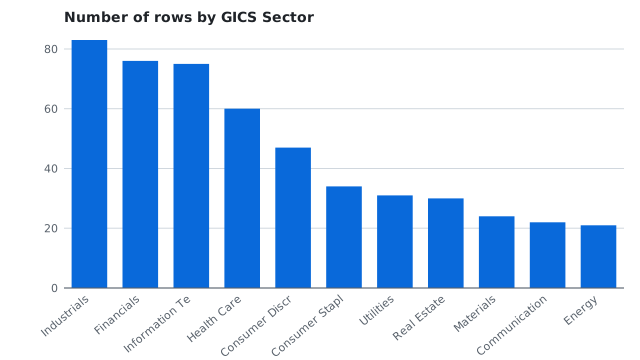
number of rows by GICS Sector (checked twice: 11 groups compared, 0 mismatches)

GICS Sectorvalue
Industrials83
Financials76
Information Technology75
Health Care60
Consumer Discretionary47
Consumer Staples34
Utilities31
Real Estate30
Materials24
Communication Services22
Energy21

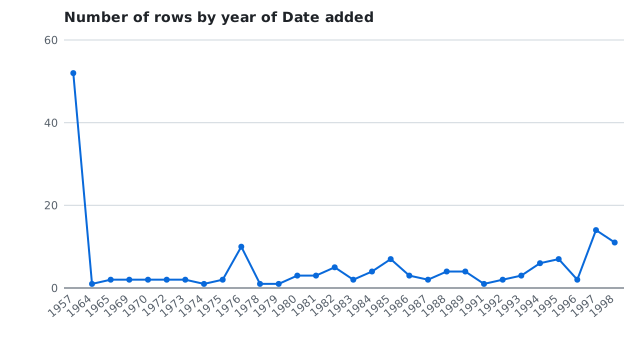
number of rows by year of Date added (checked twice: 58 groups compared, 0 mismatches), first 12 of 58

yearvalue
195752
19641
19652
19692
19702
19722
19732
19741
19752
197610
19781
19791

number of distinct Headquarters Location (checked twice: 1 groups compared, 0 mismatches)

value
250
Bar chart of S&P 500 companies by GICS sector, Industrials highest at 83.
Chart: companies by sector
Line chart of S&P 500 companies by the year they were added, from 1957.
Chart: companies by year added
Checks: 3 of 3 passed
  • companies_by_sector: number of rows by GICS Sector: Industrials: 83; recomputed exactly, 11 group(s) agree.
  • added_by_year: number of rows by year of Date added: 1957: 52; recomputed exactly, 58 group(s) agree.
  • headquarters_cities: number of distinct Headquarters Location: 250; recomputed exactly, 1 group(s) agree.
Run
run_e4143cdbcea6c1337e
Depot run
0zb9r381xr
Image
images/base.Dockerfile@3a1adeda3695 (slipstream origin/main) + scripts/example-runs from branch site-example-runs 5112d5b (local)
Sandbox
the fake provider on loopback, inside that disposable container
From its eval suite, not a live run

A plain-English question about a small sales table (version 1.1.0, eval case)

Version
1.1.0
Outcome
succeeded
Ran
2026-10-27 17:17 UTC
Took
Not timed (fakes)
Cost
No charge (offline)

The agent's offline eval suite: its real program, against a fake ContextStream, a scripted model and a fixture table, with no network. Not a live run.

What it ran on

  • evals/analyst/cases.jsonl in the Slipstream repository
Input
{
  "data": {
    "csv": "order_id,region,product,units,revenue,ordered_at,returned\n1001,West,Kettle,2,\"$1,200.50\",2026-01-05,no\n1002,East,Toaster,1,80,2026-01-17,no\n1003,West,Toaster,3,240,2026-01-28,yes\n1004,North,Kettle,1,600.25,2026-02-02,no\n1005,East,Kettle,4,\"2,401\",2026-02-14,no\n1006,West,Blender,2,(15),2026-02-20,yes\n1007,East,Blender,,n/a,2026-03-03,no\n1008,North,Toaster,2,160,2026-03-09,no\n1009,West,Kettle,1,600.25,2026-03-21,no\n1010,,Blender,1,95.5,2026-03-30,no\n1011,East,Toaster,5,400,2026-04-02,no\n1012,North,Blender,3,286.5,2026-04-15,yes\n"
  },
  "question": "Which region brought in the most revenue?"
}

Result

East brought in the most revenue, 2,881, ahead of West at 2,025.75. Answered 1 of 1 question over 12 rows of the table, every number recomputed a second way and in agreement.

Question

Which region brought in the most revenue?

Answer

East brought in the most revenue, 2,881, ahead of West at 2,025.75.

total revenue by region (checked twice: 4 groups compared, 0 mismatches)

regionvalue
East2881
West2025.75
North1046.75
(empty)95.5
Checks: 4 of 4 passed
  • translation: "Which region brought in the most revenue?" became 1 structured question.
  • answer: Every number in the answer is one the engine computed.
  • revenue_by_region: total revenue by region: East: 2881; recomputed exactly, 4 group(s) agree.
  • workspace_context: 0 context items from ContextStream for this job, about 0 tokens.
  • The input's table is shortened here.
Eval case
evals/analyst/cases.jsonl, plain-question
Depot run
0zb9r381xr

What does Data Analyst cost?

Data Analyst costs 800 ContextStream credits a run, charged only when the run succeeds; a declined, failed, cancelled or timed-out run costs nothing. Credits come with every plan: Starter is free with 10,000 a month (12 runs of Data Analyst, if spent on nothing else), and Pro is $19 a month with 25,000.

Which tools does Data Analyst work with?

Claude Code, Codex, Cursor and other MCP clients, once ContextStream offers it: through the slipstream tool of ContextStream's MCP, ss run analyst in a terminal, or the web app. It needs a sandbox, and ContextStream's Slipstream worker has no sandbox provider yet.

  • Claude Code, Codex, Cursor and other MCP clients: connect ContextStream's MCP once (setup for each editor), then ask your agent to hand the job to Data Analyst.
  • A terminal or an agent's shell: ss run analyst, installed with ContextStream's command line.
  • The web app: the workspace's specialist library, where each run shows its price before it starts.

What access does Data Analyst need?

Data Analyst gets a short-lived token for one workspace, limited to 2 scopes: Models via ContextStream and Reads context. It works in one project, and only for that run.

Model agent with a sandbox. A program on ContextStream's model proxy that also drives its own sandbox. The sandbox holds no credentials. Network: only the hosts named in your input. It is stopped after 5 min.

ScopeWhat it lets a run do
model.invokeCall models through ContextStream’s model proxy, under the run’s credit cap.
context.readRead the run’s context pack from the workspace.

How do I turn Data Analyst on?

You cannot turn Data Analyst on yet: it needs a sandbox, and ContextStream's Slipstream worker has no sandbox provider yet. It is built and tested, and its page shows how it will be called.

How do I call Data Analyst from Claude Code or Codex?

Once it is offered: ss run analyst in a terminal, or slipstream(action="run", agent="analyst", input={...}) over MCP, with the input below.

Connect ContextStream's MCP (it also writes each editor's connection):

curl -fsSL https://contextstream.io/scripts/mcp.sh | bash

Total revenue by region, largest first, with a chart and a one-sentence answer. Over MCP:

slipstream(action="run", agent="analyst", input={"data":{"url":"https://example.com/sales.csv"},"question":"Which region brought in the most revenue?"}, accepted_price_credits=800)

In a terminal (curl -fsSL https://contextstream.io/cs/install.sh | sh installs ss):

ss run analyst data:='{"url":"https://example.com/sales.csv"}' question='Which region brought in the most revenue?'

Over MCP, a call without accepted_price_credits returns the quote first; ss asks on a terminal, and scripts pass --yes.

Input

FieldTypeWhat it is
dataobject, requiredThe table: inline CSV, a base64 XLSX workbook, or a public URL.
also_allowstring[], requiredHosts the download may be redirected to, beyond the URL's own.
sheetstringThe sheet of an XLSX workbook; the first by default.
questionstringA question about the table in plain English.
questionsobject[]Structured questions, answered as given.

Other versions of Data Analyst

  • analyst@1.0.0: sandbox agent, on Slipstream's own API. Answers structured questions about a CSV or XLSX table (totals, averages, counts by group or over time) with charts, every number recomputed a second way.
Documents

PDF

docs to PDF agent

PDF lays out a source the person names (a doc, a plan, notes or markdown) as a PDF and stores it in the workspace.

600 credits a runEvals 11/11v0.1.0

Every Slipstream agent