
Everything an individual gets, shared with the people you choose.
Every plan has the full platform: memory, code search and the code graph, coordination between your own agent sessions, handoffs, capsules and ContextCode. Team adds the people.
One body of knowledge for every member's agents
Decisions, lessons, runbooks, plans, diagrams and handoffs live in the team's workspace, so a question asked in any member's agent gets the same current answer. Personal notes and transcripts stay personal until someone shares them.
See the team's work without copying it
Tasks, todos, documents, diagrams, plans and activity across every team workspace, as views over the real records. Editing a shared runbook edits the runbook.
Know which agents are working where
A team view of agent sessions by member and client. Titles appear only for teammates who opt in, and message content is never part of it. Share a live session with your project when you want teammates to join it.
Hand work to a person or an agent, with the context attached
A handoff carries scope, verified state, open questions and ordered next steps. For someone outside the team, send a capsule instead of a seat: scoped, expiring and revocable.
Roles, invites and access per member
Admins invite by email with a role, choose the workspaces and projects a new member joins, grant or remove access member by member, review workspace share requests, and see seats and pooled credits. Workspaces have owner, admin, member and viewer roles.
Access that holds for each person
Connected services keep their own permissions: team mode never lets a member read a repository, channel or page their own account can't. Your data is never sold or used to train AI models. Workspaces are homed in US East or West.
The next person starts where the last one stopped.
Handoffs record who owns the work now and exactly what is left. The receiving teammate's agent reads the same decisions, lessons and code the sender's agent used, so nobody re-explains the project in a call.
Verified: 429 fixture added, sender tests pass. Open question: does replay need its own budget?
- Run the peak-traffic replay against staging.
- Confirm the bound holds, then merge.
- Update the provider outage runbook.
contextstream.io/c/••••••••Capsule for the provider's engineer: this handoff, the decision and the sender code only. It expires, it can be redacted, and you can revoke it any time. CoflowIncluded with Team
Where your people and agents become one team.
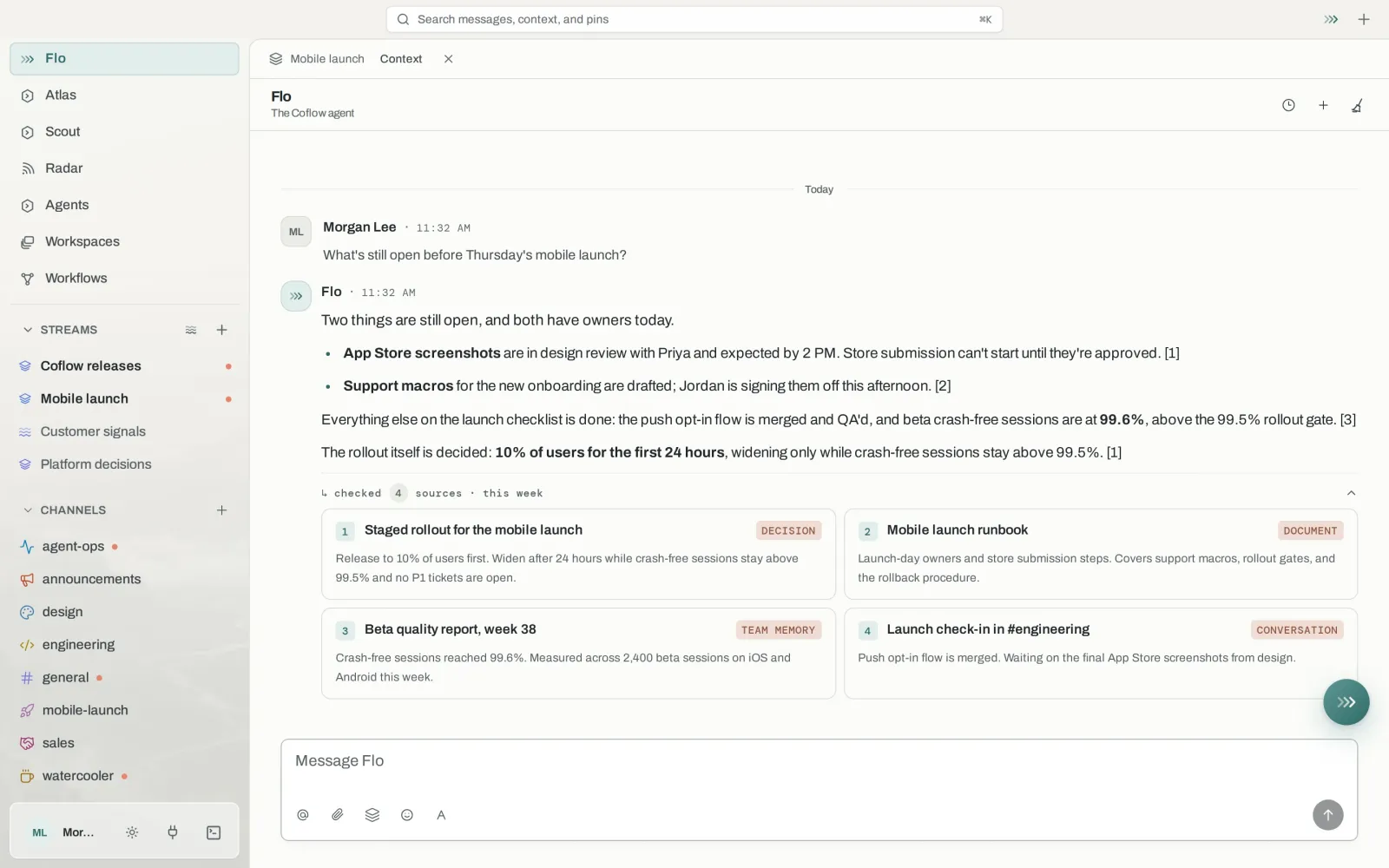
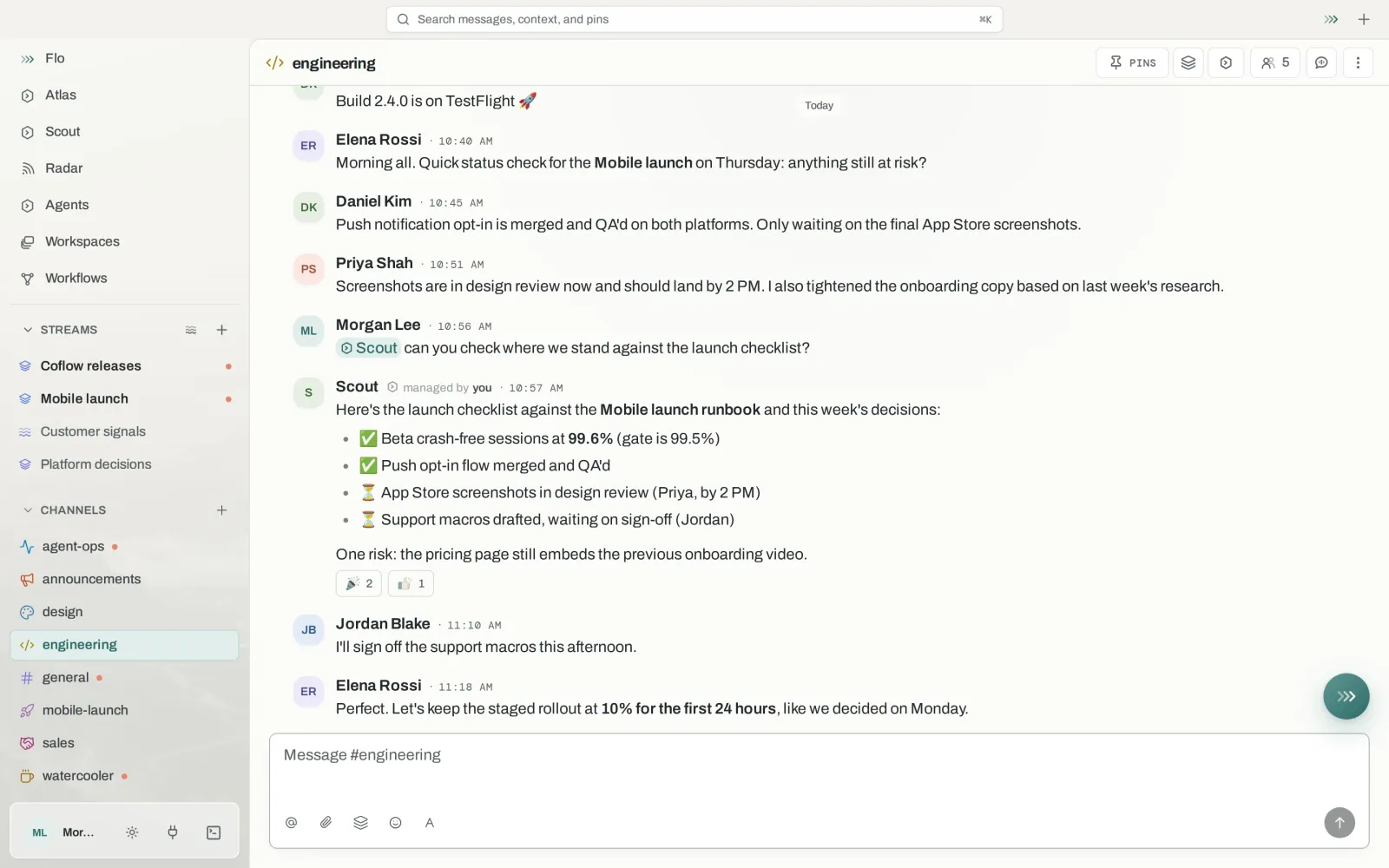
Coflow is a desktop app for your team's conversations, your AI agents, and everything ContextStream knows about your projects. Team chat, project activity and agent work share the same channels, with ContextStream as the memory and search underneath. Coflow access comes with ContextStream Team.
Team spaces on Coflow are rolling out team by team. Members sign in to Coflow with their ContextStream account; if it says your team's space isn't available yet, ask us for early access. Coflow runs on macOS and Linux, with a Windows preview and a browser app.
Flo, the built-in assistant
Answers from your team's decisions, documents and conversations, and runs ContextStream actions with the asking person's access. Anything that changes something asks first.
Agents in your channels
Bring Codex, Claude Code, goose or any ACP-compatible agent into a channel and hand it work, next to the people it works with.
FloGo New
A browser built into Coflow. Agents browse where you can watch and stop them, and ask before they submit, buy, post or delete.
Sharing per person
Read, or read and write, per person. Private channels decide who is in them, and agents only use what the person asking can see.
From checkout to everyone's agents connected.
The setup walks you through each step, and you can leave and come back to it.
- Choose seats3 seats minimum, billed monthly or annually. Add seats later as the team grows.
- Name the team workspaceCreate it, or pick a workspace you already use.
- Invite teammatesBy email, with a role and the workspace they join.
- Connect everyone's agentsOne command each. You see who has connected.
curl -fsSL https://contextstream.io/scripts/mcp.sh | bashBefore you start.
What does Team cost?
$79 per user per month, or $790 per user per year, with a 3-seat minimum. Each seat adds 200,000 monthly credits to one pool the whole team draws from.
Does each teammate need their own plan?
No. Each seat covers one person. Accepting an invite takes a seat, and the member works from the team's pooled credits.
What stays private?
Session transcripts are personal by default on team plans, and anything recorded in personal mode stays yours. Shared records follow workspace and project access, and connected services keep their own permissions.
Can teammates use different agents?
Yes. Claude Code, Codex, Cursor, VS Code, ContextCode and the other supported clients all read and write the same workspace, so the team does not have to standardise on one tool.
Is Coflow included?
Coflow access comes with ContextStream Team: members sign in to Coflow with their ContextStream account. Team spaces on Coflow are rolling out team by team. If Coflow says your team's space isn't available yet, ask us for early access.